
Download Revent.ai – Free AI‑Powered Presentation Maker for Windows, macOS, Android & iOS
Overview – What Is Revent.ai and Why It Matters
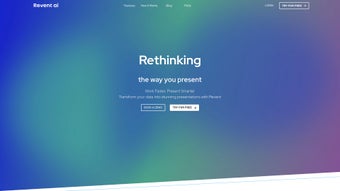
Revent.ai is a cloud‑native, AI‑driven presentation creation platform that transforms rough outlines, bullet points, or raw data into polished slide decks in a matter of minutes. Built for a broad audience that includes students, educators, marketers, sales teams, and corporate executives, the tool eliminates the repetitive and time‑consuming aspects of slide design, content research, and visual storytelling. By simply feeding the engine with a topic description, a Word document, or a spreadsheet, Revent.ai automatically generates a structured narrative, selects relevant graphics from royalty‑free libraries, and applies a consistent brand style throughout the deck.
Because the entire application runs in a modern web browser, there is no bulky software to install, no manual update cycle, and the service is instantly accessible from any device with an internet connection. Security is a core pillar: all data transmission uses TLS 1.3 encryption, and the platform complies with GDPR, ensuring that confidential business information remains protected. The AI models behind Revent.ai have been trained on millions of professional presentations, allowing them to understand context, tone, and visual hierarchy, which translates into a seamless user experience that feels both intuitive and powerful.
Whether you need a quick academic lecture, a persuasive sales pitch, or an in‑depth quarterly report, Revent.ai promises to cut the production time dramatically while preserving the quality and customizability expected from a professional design tool.
Core Features and Benefits of Revent.ai
- AI‑Generated Slide Content: Input a simple prompt, upload a document, or paste bullet points and the AI creates structured slide text, speaker notes, and data visualizations that are ready for review.
- Smart Design Templates: Choose from a library of responsive, modern templates that automatically adjust colors, fonts, and layout to match your brand guidelines.
- Automatic Image & Icon Sourcing: The system scans royalty‑free image banks and icon sets to find visuals that perfectly complement each slide’s message.
- Collaborative Real‑Time Editing: Multiple users can edit, comment, and approve slides simultaneously, with changes highlighted for easy tracking.
- One‑Click Export Options: Export decks to PowerPoint (.pptx), PDF, or Google Slides while preserving animations, transitions, and embedded media.
- Data Integration: Connect spreadsheets, CSV files, or APIs to auto‑populate charts, tables, and dashboards directly within the presentation.
- Voice‑Over Narration: Add recorded audio or use the built‑in text‑to‑speech engine to generate synchronized narration for each slide.
- Version History & Rollback: Every change is saved, allowing you to revert to earlier versions or compare revisions side‑by‑side.
- API Access for Automation: Developers can integrate Revent.ai into internal workflows, automating recurring report generation.
- Brand Asset Management (Premium): Upload custom logos, color palettes, and fonts to ensure every deck reflects corporate identity.
These features combine to deliver a compelling value proposition: speed, consistency, and creativity without the steep learning curve traditionally associated with design software. Users report that the AI suggestions dramatically reduce writer’s block, while the granular manual controls ensure the final product remains authentic to the creator’s voice. The collaborative environment also shortens review cycles, making it ideal for teams that need to iterate quickly. In short, Revent.ai offers a full‑stack solution that covers content generation, visual design, data visualization, and distribution—all under a single, secure, and easy‑to‑use interface.
Installation, Usage & Compatibility – Getting Started on Any Device
Because Revent.ai is delivered as a Software‑as‑a‑Service (SaaS) platform, there is no traditional installation process. All you need is a modern web browser and a stable internet connection. Follow the steps below to launch your first presentation:
- Create Your Account: Visit Revent.ai and sign up using an email address or single‑sign‑on (Google, Microsoft, Apple). A verification email activates your free tier, which includes unlimited projects with a small watermark on exports.
- Select a Project Template: After logging in, click “New Presentation.” Choose a purpose—business pitch, academic lecture, marketing deck—to let the AI recommend a suitable template and layout.
- Provide Source Material: Type directly into the “Prompt” box, upload a Word or PDF file, or paste a Google Docs link. For data‑rich presentations, import CSV or Excel files; the AI will automatically generate charts and tables.
- Review and Refine the AI Draft: The engine produces an outline, slide titles, body text, and speaker notes. You can edit any element, reorder sections, or add custom annotations. AI‑suggested edits appear in a highlighted color for quick identification.
- Customize Visual Design: Switch to the “Design” tab to adjust color schemes, replace images, or modify typography. Changes are reflected instantly in a live preview, ensuring the deck looks exactly as intended.
- Collaborate with Team Members: Click “Share” to invite collaborators via email. Assign roles (Editor, Commenter, Viewer) and use the built‑in chat panel for real‑time discussion.
- Export or Publish: When the deck is complete, click “Export.” Choose PowerPoint, PDF, or Google Slides, or generate a shareable link with optional password protection. Exported files retain animations and transitions created in the web editor.
Revent.ai is compatible with any modern browser—including Chrome, Edge, Firefox, and Safari—on Windows 10/11, macOS 12+, Android 8+, and iOS 13+. Because all processing occurs in the cloud, hardware requirements are minimal; a laptop, tablet, or even a smartphone can handle the workload as long as the network connection is stable. For power users, the platform provides a RESTful API that can be called from internal systems to generate scheduled reports or automated slide decks, extending the tool’s utility beyond ad‑hoc creation.
Frequently Asked Questions (FAQ)
Is Revent.ai really free to use?
Yes. The free tier allows unlimited project creation with a small watermark on exported files. Upgrading to a paid plan removes the watermark and unlocks advanced branding, higher‑resolution assets, and priority AI processing.
Can I import an existing PowerPoint file for editing?
Absolutely. Upload a .pptx file and Revent.ai converts each slide into editable blocks, enabling you to apply AI‑generated enhancements, restructure content, or replace visuals while preserving the original layout.
How secure is my data on Revent.ai?
All data transmission uses TLS 1.3 encryption, and files are stored on GDPR‑compliant servers. Enterprise customers benefit from additional security options such as SSO, audit logs, and regional data residency.
Does Revent.ai support custom branding and corporate assets?
Yes. Business and Enterprise plans allow you to upload custom logos, define color palettes, and add proprietary fonts. The AI respects these settings throughout the deck, ensuring every slide aligns with corporate visual standards.
Can I use Revent.ai on mobile devices?
The responsive web app works flawlessly on Android and iOS browsers. A dedicated mobile app is currently in beta, offering offline note‑taking that syncs automatically when you reconnect to the internet.
Ready to experience the speed of AI‑driven slide creation? Start your free account today and turn ideas into stunning presentations in seconds.
Conclusion & Call to Action
Revent.ai lives up to its promise of “effortless AI‑powered presentation creation.” By automating content generation, visual design, data integration, and export, it frees users from the repetitive grind of slide assembly while still providing enough manual controls to keep the final product authentic. Its cloud‑first architecture guarantees cross‑platform access, and the collaborative tools make team workflows smooth and efficient. Minor drawbacks—such as the requirement for an internet connection and occasional AI misinterpretations of niche terminology—are outweighed by the substantial productivity gains and flexible pricing. For anyone who regularly builds decks—whether for academic lectures, sales pitches, or internal reporting—Revent.ai is a compelling addition to the toolkit.
Take action now: Click the button below to launch Revent.ai, start a free project, and see how quickly you can produce a professional presentation without the usual hassle.



.png)



